# Send Apache Logs to Mongodb
This article explains how to use [Fluentd](https://fluentd.org/)'s MongoDB Output plugin \([`out_mongo`](../output/mongo.md)\) to aggregate semi-structured logs in realtime.
## Background
[Fluentd](https://fluentd.org/) is an advanced open-source log collector originally developed at [Treasure Data, Inc](https://www.treasuredata.com/). Because Fluentd handles logs as semi-structured data streams, the ideal database should have strong support for semi-structured data. Several candidates meet this criterion, but we believe [MongoDB](https://www.mongodb.org/) is the market leader.
MongoDB is an open-source, document-oriented database developed at [MongoDB, Inc](https://www.mongodb.com/). It is schema-free and uses a JSON-like format to manage semi-structured data.
This article will show you how to use [Fluentd](https://fluentd.org/) to import Apache logs into MongoDB.
## Mechanism
The figure below shows how things will work:
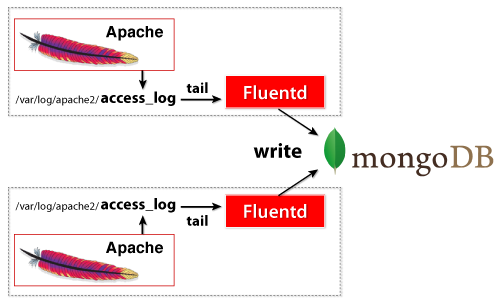
Fluentd does these three \(3\) things:
1. It continuously "tails" the access log file.
2. It parses the incoming log entries into meaningful fields \(such as `ip`,
`path`, etc.\) and buffers them.
3. It writes the buffered data to MongoDB periodically.
## Prerequisites
The following software/services are required to be set up correctly:
* [Fluentd](https://www.fluentd.org/)
* [MongoDB](https://www.mongodb.org/)
* [Apache](https://httpd.apache.org/) (with the Combined Log Format)
For simplicity, this article will describe how to set up a one-node configuration.
Please install the above prerequisites software/services on the same node.
You can install Fluentd via major packaging systems.
* [Installation](../installation/)
For MongoDB, please refer to the following downloads page:
* [MongoDB Downloads](https://www.mongodb.org/downloads)
## Install MongoDB Plugin
If [`out_mongo`](../output/mongo.md) (fluent-plugin-mongo) is not installed yet, please install it manually.
See [Plugin Management](../installation/post-installation-guide.md#plugin-management) section for how to install fluent-plugin-mongo on your environment.
## Configuration
Let's start configuring Fluentd. If you used the deb/rpm package, Fluentd's config file is located at `/etc/fluent/fluentd.conf`.
### Tail Input
For the input source, we will set up Fluentd to track the recent Apache logs \(typically found at `/var/log/apache2/access_log`\). The Fluentd configuration file should look like this:
```text
@type tail
path /var/log/apache2/access_log
pos_file /var/log/fluent/apache2.access_log.pos
@type apache2
tag mongo.apache.access
```
Please make sure that your Apache outputs are in the default **combined** format. `format apache2` cannot parse custom log formats. Please see the [`in_tail`](../input/tail.md) article for more details.
Let's go through the configuration line by line:
1. `@type tail`: The `tail` Input plugin continuously tracks the log
file. This handy plugin is included in Fluentd's core.
2. `@type apache2` in ``: Uses Fluentd's built-in Apache log parser.
3. `path /var/log/apache2/access_log`: The location of the Apache log.
This may be different for your particular system.
4. `tag mongo.apache.access`: `mongo.apache.access` is used as the tag to route
the messages within Fluentd.
That's it! You should now be able to output a JSON-formatted data stream for Fluentd to process.
### MongoDB Output
The output destination will be MongoDB. The output configuration should look like this:
```text
# plugin type
@type mongo
# mongodb db + collection
database apache
collection access
# mongodb host + port
host localhost
port 27017
# interval
flush_interval 10s
# make sure to include the time key
time_key time
```
The match section specifies the regexp used to look for matching tags. If a matching tag is found in a log, then the config inside `...` is used \(i.e. the log is routed according to the config inside\). In this example, the `mongo.apache.access` tag \(generated by `tail`\) is always used.
The `**` in `mongo.**` matches zero or more period-delimited tag parts \(e.g. `mongo`/`mongo.a`/`mongo.a.b`\).
**`flush_interval`** specifies how often the data is written to MongoDB. The other options specify MongoDB's host, port, db, and collection.
For additional configuration parameters, please see the [MongoDB Output plugin](../output/mongo.md) article. If you are using ReplicaSet, please see the [MongoDB ReplicaSet Output plugin](../output/mongo_replset.md) article.
## Test
To test the configuration, just ping the Apache server. This example uses the `ab` \(Apache Bench\) program:
```text
$ ab -n 100 -c 10 http://localhost/
```
Then, access MongoDB and see the stored data:
```text
$ mongo
> use apache
> db["access"].findOne();
{ "_id" : ObjectId("4ed1ed3a340765ce73000001"), "host" : "127.0.0.1", "user" : "-", "method" : "GET", "path" : "/", "code" : "200", "size" : "44", "time" : ISODate("2011-11-27T07:56:27Z") }
{ "_id" : ObjectId("4ed1ed3a340765ce73000002"), "host" : "127.0.0.1", "user" : "-", "method" : "GET", "path" : "/", "code" : "200", "size" : "44", "time" : ISODate("2011-11-27T07:56:34Z") }
{ "_id" : ObjectId("4ed1ed3a340765ce73000003"), "host" : "127.0.0.1", "user" : "-", "method" : "GET", "path" : "/", "code" : "200", "size" : "44", "time" : ISODate("2011-11-27T07:56:34Z") }
```
## Conclusion
Fluentd + MongoDB makes real-time log collection simple, easy, and robust.
## Learn More
* [Fluentd Architecture](https://www.fluentd.org/architecture)
* [Fluentd Get Started](../quickstart/)
* [MongoDB Output Plugin](../output/mongo.md)
* [MongoDB ReplicaSet Output Plugin](../output/mongo_replset.md)